Google Lets You Ask. Yelp Says Don’t: A Review Workflow for Tulsa Businesses
Build a Tulsa review workflow that follows Google and Yelp rules, avoids review gating, and gives every response a clear human owner.
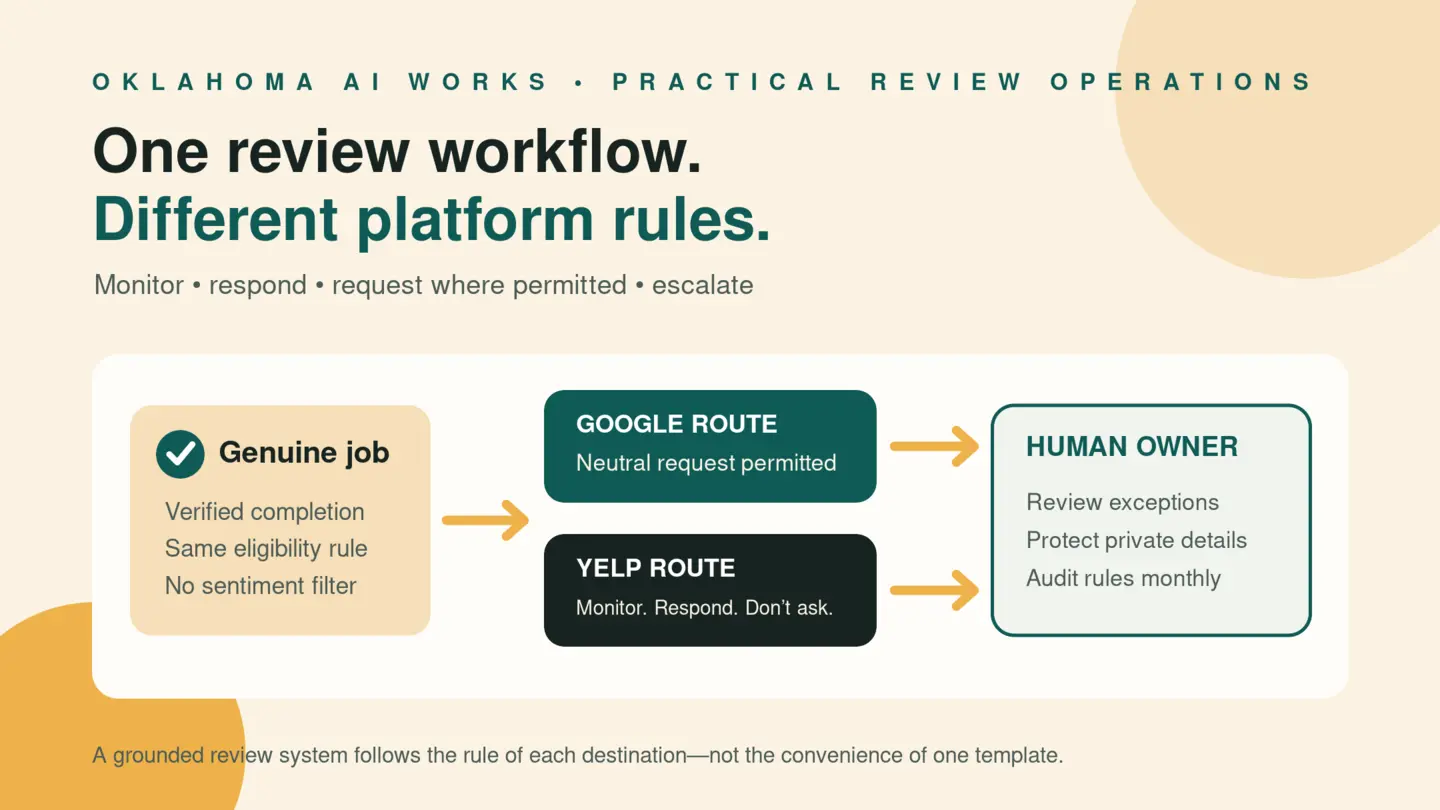
A customer finishes a job, pays the invoice, and says everything went well. Your automation sends one message with links to every review site you use.
That sounds efficient. It can also be the wrong workflow.
Google and Yelp do not give businesses the same instructions. Google allows a business to encourage reviews that reflect genuine experiences, provided it does not offer incentives or try to influence the rating or wording. Yelp tells businesses not to ask customers for reviews at all. Federal rules add another layer around fake reviews, sentiment-conditioned incentives, insider relationships, and suppression.
The practical answer is not to stop paying attention to reviews. It is to stop treating every platform as interchangeable.
For a Tulsa business, a useful review system should monitor, respond, request where permitted, and escalate human judgment.
Start with a platform rule, not one universal link
Many review tools begin with a list of destinations: Google, Yelp, Facebook, BBB, and an industry directory. A better setup begins with a rule for each destination.
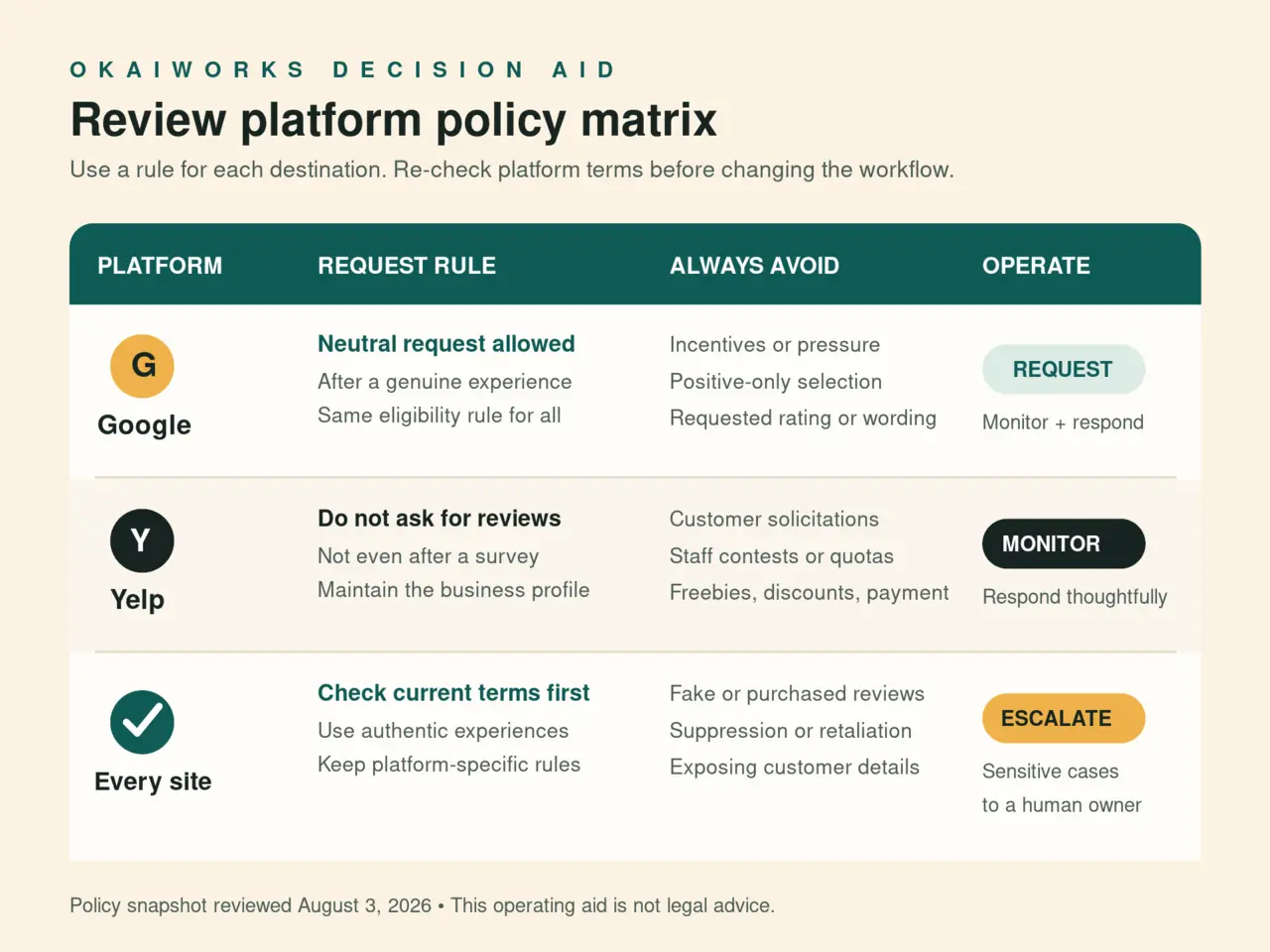
Google’s current Maps policy says merchants may encourage content based on a genuine experience without incentives and without attempting to influence the rating or review. It prohibits selectively soliciting positive reviews, discouraging negative reviews, pressuring customers, requesting particular wording, and setting staff quotas for reviews.
Yelp’s current support guidance is more restrictive. It says not to ask customers, mailing-list subscribers, friends, or family to review the business. It also says not to ask for a Yelp review after collecting feedback through a survey or form. Yelp warns that its software may not recommend reviews that appear to have been requested.
That means the same post-service automation should not contain both a neutral Google request and a Yelp request. Give each platform its own operating rule.
Build the workflow in six steps
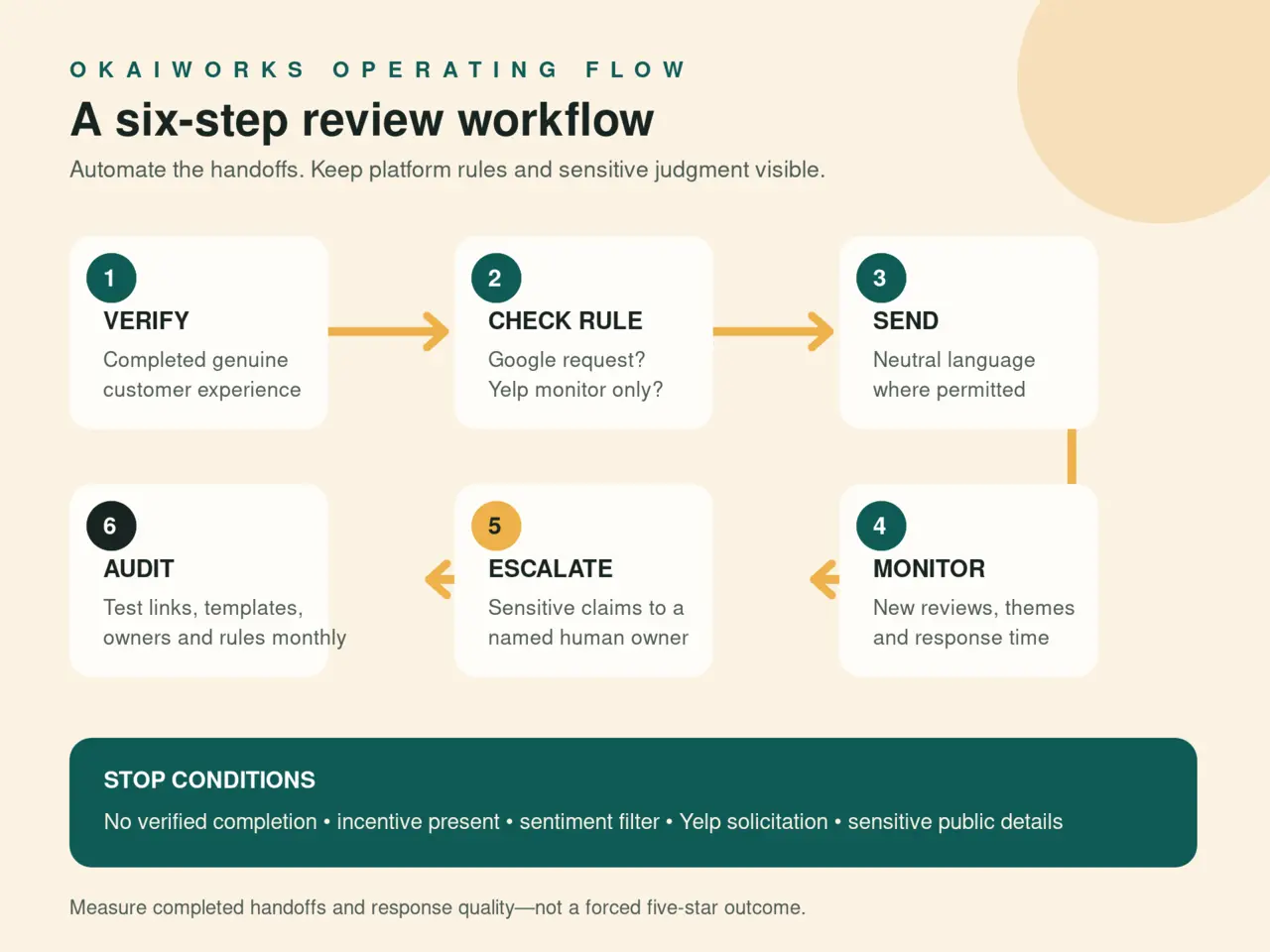
1. Define a real completion event
Do not ask simply because a customer entered your database. Trigger the workflow only after a genuine experience: a completed service, fulfilled order, attended appointment, or closed support case.
Choose an event your system can verify. “Invoice marked paid” may work for one business. “Technician closes the job” may work for another. If cancellations, no-shows, estimates, or unresolved callbacks use the same status, clean that up before automating anything.
The trigger should not be “customer seems happy.” Sending requests only to people who gave high survey scores is review gating. On Google, selectively soliciting positive reviews is prohibited. The safer rule is operational and neutral: everyone who completed the same eligible type of transaction enters the same permitted request process.
2. Send a neutral request only where the platform permits it
A plain Google request does not need clever language:
Thanks for choosing us. If you would like to share your experience, you can leave an honest Google review here: [link].
Do not say “Leave us five stars,” suggest phrases to include, or offer a discount, drawing entry, free add-on, or employee reward tied to the review. Do not ask the customer to write the review while a staff member watches.
Keep Yelp out of this request. You can claim and maintain the Yelp profile, monitor new reviews, and respond through the business account. But Yelp’s rule is not “ask neutrally.” Its published guidance says not to ask.
For Facebook, BBB, healthcare, marketplace, and industry-specific sites, check the current platform terms before adding a request route. Do not assume Google’s rule applies everywhere.
3. Separate private feedback from public review requests
A feedback form can help find a missed callback, confusing invoice, or service problem. It should not become a sorting machine that sends happy customers to Google and unhappy customers to a private inbox.
Use private feedback for operations. Give customers a clear support path whether their feedback is positive, neutral, or negative. If your Google request is part of the same post-service process, apply the same eligibility rule regardless of predicted sentiment.
On Yelp, do not follow private feedback with a review request. Yelp specifically warns businesses not to ask after surveys or contact forms.
This separation matters even if AI scores the message. Sentiment analysis can help prioritize a complaint for a manager; it should not decide who is allowed to see a public-review link.
4. Give every response a human owner
AI can draft a polite response, classify a common theme, and alert the right person. It should not independently resolve every review.
A routine positive review can use a short, specific thank-you that does not reveal private customer details. A factual complaint may need the job record checked first. A threat, allegation, safety issue, discrimination claim, medical detail, legal dispute, chargeback, or employee accusation should go to a named manager without an automated public reply.
Avoid confirming that someone is a customer when the service itself is sensitive. Do not paste invoice details, appointment information, phone numbers, addresses, or internal notes into a response. Move account-specific resolution to a private channel.
Set a response owner and a backup. “The office handles reviews” is not ownership. “Maria checks at 10 a.m.; Devon covers when she is out; legal or safety allegations go to the owner” is a workflow.
5. Keep incentives and suppression out of the system
The FTC’s Consumer Reviews and Testimonials Rule took effect October 21, 2024. FTC guidance says businesses, agencies, and reputation-management companies can face liability for covered practices such as creating or selling fake reviews, providing incentives conditioned on a particular sentiment, and certain review-suppression conduct.
The federal rule does not make every incentive for every review automatically illegal. FTC staff says an incentive not conditioned on positive or negative sentiment is not prohibited by that specific rule, although disclosure and other FTC Act issues may still apply. Platform policies can be stricter: Google prohibits incentives for reviews, and Yelp says not to solicit reviews or offer freebies, discounts, or payment.
For a local business, the clean operational rule is simpler: do not use incentives in third-party review requests. Never pay to remove a negative review, threaten a reviewer, buy reviews, or ask employees and family members to pose as ordinary customers.
If a vendor promises a stream of five-star reviews, ask exactly how it gets them. Outsourcing the workflow does not outsource the risk.
6. Audit the system monthly
Review automation drifts. Staff changes. Links break. A new survey gets inserted before the request. Someone edits the template to say “five stars.” A vendor adds Yelp to a destination list.
Once a month, test the workflow with a non-customer test record that cannot post a public review. Confirm:
- the trigger follows a verified completed experience
- all eligible customers receive the same permitted route
- Google language is neutral and includes no incentive
- Yelp receives no solicitation message
- sensitive reviews stop for human review
- the response owner and backup still have access
- private customer information does not enter public drafts
- platform policies have not materially changed
Measure the workflow without chasing stars
A five-star target encourages the wrong behavior. Track measures the team can actually control:
- eligible completed experiences
- permitted requests delivered
- broken or bounced links
- new reviews by platform
- median response time
- sensitive reviews escalated
- unresolved service issues found through feedback
- policy checks completed on schedule
Do not grade employees on how many five-star reviews mention their names. Google’s policy specifically prohibits merchants from requesting staff quotas or specific content identifying a staff member. Measure whether the customer received good service, whether the request was compliant, and whether the business handled feedback responsibly.
BrightLocal’s 2026 survey reported that its 1,002-person U.S. panel used an average of six review sites when choosing businesses. That is useful evidence that reputation is spread across platforms, not proof that every Tulsa customer uses six sites or that every business should solicit on all six. The practical lesson is to monitor the profiles your customers can actually find and apply the correct rule to each one.
A simple policy for a small team
Your written policy can fit on one page:
- We request reviews only after a verifiable genuine customer experience.
- We use neutral language and do not filter customers by predicted satisfaction.
- We do not offer incentives or request a rating, wording, or employee mention.
- We do not ask for Yelp reviews.
- We respond without exposing customer information.
- Sensitive reviews require a named human approver.
- We check templates, routing, links, and platform rules monthly.
That will not manufacture a perfect rating. It will create something more useful: a review operation your staff can explain, your customers can trust, and your automation is less likely to quietly break.
Want to replace a one-link-fits-all campaign with a platform-aware process? Ask OKAIWorks to map your review workflow, approval rules, and monthly audit. Talk with Oklahoma AI Works.
Source reviewed
- Google Maps User Generated Content Policy: Prohibited and restricted content (reviewed August 3, 2026)
- Yelp Support Center: Don’t Ask for Reviews (reviewed August 3, 2026)
- Federal Trade Commission: The Consumer Reviews and Testimonials Rule: Questions and Answers (reviewed August 3, 2026)
- BrightLocal: Local Consumer Review Survey 2026 (vendor survey of 1,002 U.S. adults; reviewed August 3, 2026)